 In-Memory Data Grid - achieve unparalleled speed, persistence, and accuracy.
XAP MCP Tools Overview
Introduction
The XAP GigaSpaces eXtreme Application Platform.
Provides a powerful solution for data processing, launching, and running digital services MCP Server provides a comprehensive set of tools for interacting with GigaSpaces XAP clusters through the Model Context Protocol (MCP). These tools are organized into three main categories based on their functionality, plus a foundational Semantic Layer Foundation that powers intelligent data discovery and schema management.
GigaSpaces eXtreme Application Platform.
Provides a powerful solution for data processing, launching, and running digital services MCP Server provides a comprehensive set of tools for interacting with GigaSpaces XAP clusters through the Model Context Protocol (MCP). These tools are organized into three main categories based on their functionality, plus a foundational Semantic Layer Foundation that powers intelligent data discovery and schema management.
These features are IN PREVIEW mode, customers are welcome to experience them in a lower environment and send feedback. Please contact us if you want to cooperate on using XAP execution or data in agentic workflow, Or if your use case requires exposure of additional tools and capabilities.
Access
Access is controlled by the service account. In a secured environment the security service will be used to generate a token based on the role’s permissions This token will be added to the MCP configuration.
Rate Limiting
For each MCP service, this defines the number of operations allowed per minute, preventing an agent doing too many operations and attacking the grid environment.
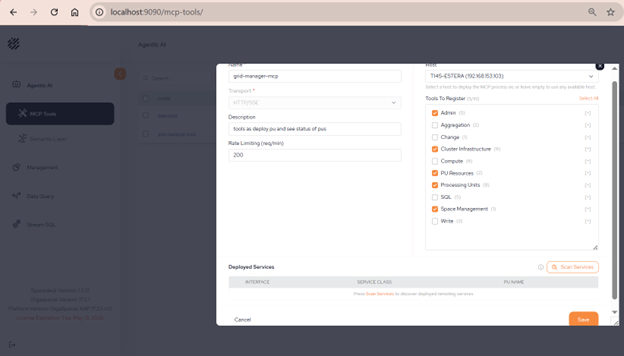
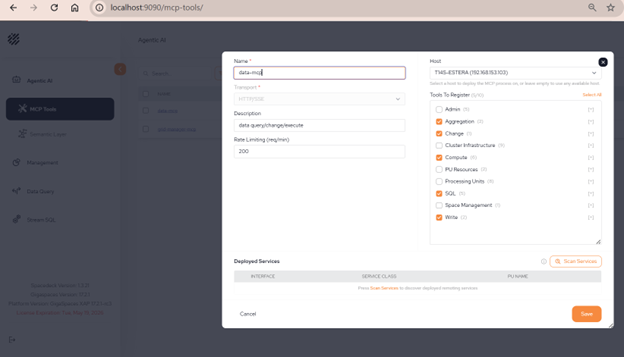
How to define new MCP service using spaceDeck
Management MCP:
Data Access & Data computation MCP
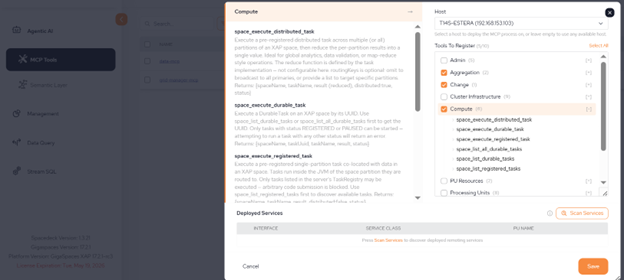
Pressing the + icon will list all related tools in the category and will show details on each one
After MCP service is deployed, copy or download the configuration file. When working in a secured environment, paste the token as well.
Place this configuration file on your agent settings. For example, in claude code it will be .mcp.json file.
Group 1: Grid Management
Purpose
Manage cluster topology, deploy and monitor Processing Units This is the unit of packaging and deployment in the GigaSpaces Data Grid, and is essentially the main GigaSpaces service. The Processing Unit (PU) itself is typically deployed onto the Service Grid. When a Processing Unit is deployed, a Processing Unit instance is the actual runtime entity. (PUs), control spaces, and access cluster infrastructure including containers (GSCs), managers, and hosts. These tools handle the operational aspects of running an XAP grid.
Cluster & Space Management
Processing Unit Management
|
Tool |
Description |
|---|---|
| pu This is the unit of packaging and deployment in the GigaSpaces Data Grid, and is essentially the main GigaSpaces service. The Processing Unit (PU) itself is typically deployed onto the Service Grid. When a Processing Unit is deployed, a Processing Unit instance is the actual runtime entity._list |
List all deployed Processing Units with their status |
|
pu_deploy |
Deploy a Processing Unit from an uploaded JAR with topology and SLA config |
|
pu_get |
Get detailed status and metrics for a specific Processing Unit |
|
pu_undeploy |
Remove a deployed Processing Unit |
| pu_quiesce |
Gracefully quiesce a Processing Unit (stop accepting new requests) |
|
pu_unquiesce |
Resume a quiesced Processing Unit |
Infrastructure & Cluster
|
Tool |
Description |
|---|---|
| cluster_get_info | Get cluster version, build info, and basic configuration |
|
hosts_list |
List all physical/virtual hosts with identifiers and resource info |
|
host_get |
Get detailed information for a specific host |
|
managers_list |
List all XAP managers with status, roles, and host assignments |
| manager_restart |
Restart a manager instance (requires confirmation) |
|
manager_get_dump_url |
Get download URL for manager diagnostic services dump |
Possible use is combining those tools with MCP of the metrics framework to troubleshoot grid issues and understand resource utilization.
Group 2: Generic Access, Write & Change Data
Purpose
Execute data operations on XAP spaces including querying, reading, writing, updating, and deleting entries. Supports complex queries with filters, aggregations, SQL with JOINs, and surgical in-place mutations for efficient data manipulation.
Read Operations (Query & Browse)
|
Tool |
Description |
|---|---|
| space_query | Fetch entries of a single type with optional SQL WHERE filter (max 500 rows) |
|
space_sql |
Execute complete SQL with SELECT, FROM, WHERE, GROUP BY, ORDER BY, LIMIT. Supports JOINs |
| space_count |
Count entries matching an optional filter |
|
space_read_by_id |
Read a single entry by its ID |
| space_aggregate |
Run collocated aggregations (count, sum, average, max, min) on large datasets |
Write Operations (Create & Update)
|
Tool |
Description |
|---|---|
| space_write | Create/write/update a single entry with optional lease configuration |
|
space_write_batch |
Write/update multiple entries in one round-trip (max 100 entries) |
| space_take |
Read and remove an entry atomically |
|
space_take_by_id |
Read and remove a single entry by ID atomically |
| space_take_batch |
Remove multiple entries matching a WHERE clause |
Change Operations (Surgical Mutations)
|
Tool |
Description |
|---|---|
| space_change | Apply in-place mutations to entries (set, unset, increment, addToCollection, putInMap, etc.) |
Supported Change Operations
-
set — Update a field to a new value
-
unset — Remove a field from an entry
-
increment — Increase a numeric field by a value
-
addToCollection — Add an element to a collection field
-
removeFromCollection — Remove an element from a collection field
-
putInMap — Add/update a key-value pair in a map field
-
removeFromMap — Remove a key from a map field
Possible use cases: Chat with the data, run agentic flows that consume some aggregations from the space, write or change space data as result of other processes outside the XAP framework.
Group 3: User-Defined Logic & Compute
Purpose
Execute custom business logic and distributed tasks co-located with data on XAP partitions. Enable push-computation (bring code to data) for efficient processing of large datasets without data movement.
Task Execution
|
Tool |
Description |
|---|---|
| space_execute_registered_task | Execute a pre-registered single-partition task co-located with data |
|
space_execute_distributed_task |
Execute a task on all partitions and aggregate results |
| space_list_registered_tasks |
Discover available pre-registered tasks in a space |
Remote Services
|
Tool |
Description |
|---|---|
| space_execute_remote_service | Execute a pre-registered remote service method on a partition |
Durable Tasks
|
Tool |
Description |
|---|---|
| space_get_durable_tasks | Retrieve scheduled/executing durable tasks with status |
|
space_get_task_result |
Get the result of a previously executed task by ID |
Key Benefits
-
Push-Computation: Execute code where the data lives, eliminating network overhead
-
Distributed Processing: Run tasks on all partitions for parallel computation
-
Durable Execution: Tasks persist across failures and recoveries
-
Pre-Registered: Only whitelisted tasks from TaskRegistry can execute (security)
Possible use cases
Use the XAP colocation abilities and push executions to data process. Use either predefined logic or dynamically define new logic that can be run on the grid. Instead of bringing data and analyze it by the LLM, save time and tokens by sending only code instructions to XAP, and get deterministic final answer back as part of agentic workflow.
Notes
-
All tools support comprehensive logging and audit trails
-
Query operations are safe-guarded with result truncation (max 500 rows by default)
-
Write operations require explicit access permissions
-
Admin operations require confirmation flag (confirm=true)
-
Tasks execute asynchronously — use request IDs for tracking
-
The semantic layer is automatically maintained and indexed for optimal performance