 In-Memory Data Grid - achieve unparalleled speed, persistence, and accuracy.
XAP Agentic Data Units (ADU) - Preview
ADU might require a different license in newer versions.
Reference examples: gs-home/examples/ADU
What an ADU Is
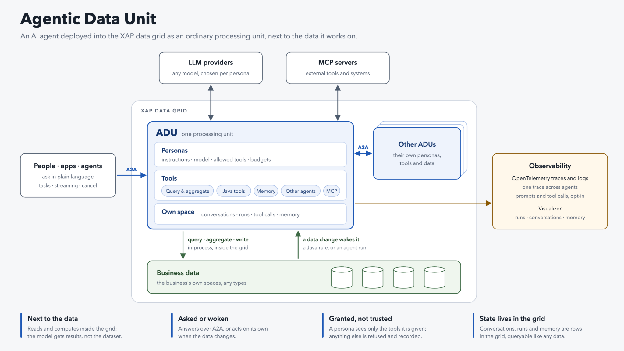
An Agentic Data Unit (ADU) is a GigaSpaces Processing Unit This is the unit of packaging and deployment in the GigaSpaces Data Grid, and is essentially the main GigaSpaces service. The Processing Unit (PU) itself is typically deployed onto the Service Grid. When a Processing Unit is deployed, a Processing Unit instance is the actual runtime entity. (PU This is the unit of packaging and deployment in the GigaSpaces Data Grid, and is essentially the main GigaSpaces service. The Processing Unit (PU) itself is typically deployed onto the Service Grid. When a Processing Unit is deployed, a Processing Unit instance is the actual runtime entity.) that embeds an autonomous AI agent directly inside the in-memory data grid, alongside the data it operates on. Instead of treating AI agents as external services that pull datasets over the network, an ADU executes indexed queries and processing directly against the grid. It also persists its entire operational state, as conversations, runs, transcripts, tool calls, and memory, inside its own embedded Space Where GigaSpaces data is stored. It is the logical cache that holds data objects in memory and might also hold them in layered in tiering. Data is hosted from multiple SoRs, consolidated as a unified data model.. An ADU is a new, advanced type of stateful PU.
An ADU is built from seven parts:
-
Personas. An agent identity with its instructions, model, allowed tools, and limits on model round trips and tool calls. A tool that a persona does not list is never offered to it.
-
Tools. Space tools built into the unit (for example,
space_queryandspace_aggregate), memory tools (RememberandRecall), your own Java tools, and peer-agent tools. -
Watches. React to a change in a Space, filtered by a
whereclause and an operation (write or update). The handler is either plain Java (no model) or a persona (the model decides). -
An A2A server. Publishes an agent card and answers
SendMessage,GetTask,CancelTask, andSendStreamingMessage. -
Peers. A unit can call another agent over A2A and use the answer.
-
Models. Declared as
adu.llm.<id>.*. A persona names the model it uses. Thesmokemodel answers with one fixed sentence and needs no key, which is useful for testing the wiring. -
Embedded Space. Holds the data related to the agent's activities: conversations, runs, memory, and notes. Business data lives in a separate Space.
Use an ADU when the agent should answer or process data that lives in the grid, when a data change needs either a judgement (a model) or a deterministic reaction (Java), or when interaction with other agents is required. A unit that only reacts with Java needs no model at all and can use the A2A protocol.
ADUs react in real time via two primary triggers:
-
Data-Driven Triggers: State mutations, that is, changes inside the in-memory data grid, can automatically wake the ADU.
-
External Agent Requests: Calls routed over the standard Agent-to-Agent (A2A) protocol allow external multi-agent systems to invoke the unit.
Data-Driven Triggers (AduWatch)
An AduWatch monitors a reference Space for matching operations (write, update, take), filtered by a SQL where clause. Every watch binds to either a deterministic Java handler or a non-deterministic persona handler.
Deterministic Handler (Java, No LLM)
This handler executes Java code directly in response to a Space event, with built-in support for pushing notifications to external agents over A2A. Use dispatch="inline" for fast execution on the calling thread, or dispatch="queued" for a separate thread pool.
<bean id="order-cancelled" class="com.gigaspaces.adu.AduWatch">
    <property name="gigaSpace" ref="orderSpace"/>
    <property name="type" value="com.gigaspaces.example.adu.core.Order"/>
    <property name="where" value="status = 'CANCELLED'"/>
    <property name="operations" value="update"/>
    <property name="handler" value="noteTheCancellation"/>
    <property name="dispatch" value="inline"/>
</bean>
The handler must implement the AduChangeHandler interface:
void handle(AduChange change);
Persona-Based Handler (LLM)
This handler delegates the Space event to an AduPersona. Set persona instead of handler, and dispatch asynchronously via queued.
<bean id="large-order" class="com.gigaspaces.adu.AduWatch">
<property name="gigaSpace" ref="orderSpace"/>
<property name="type" value="com.gigaspaces.example.adu.core.Order"/>
<property name="where" value="status = 'NEW' AND amount > 10000"/>
<property name="operations" value="write"/>
<property name="persona" value="reviewer"/>
<property name="dispatch" value="queued"/>
</bean>
Personas and Tools
An AduPersona encapsulates an agent's role, instructions, model reference (llm), allowed tools, and execution guardrails (maxModelRoundTrips and maxToolCalls). If a persona references a tool name that does not match any declared tool, deployment fails at startup.
ADU personas can invoke tools from four sources:
-
Built-in Space and Memory Tools:
space_query,space_aggregate,Remember, andRecall. -
Custom Java Tools: Defined as
AduToolbeans (withAduParamparameter definitions) backed by classes that implementAduToolBody. -
MCP Server Integrations: Configured by placing an
mcp.jsonfile alongsidepu.xmland referencing the desired tools in the persona declaration. -
Peer Agent Tools: External A2A agents exposed as callable tools via their configured alias or advertised skills.
Example persona:
<bean class="com.gigaspaces.adu.AduPersona">
   <property name="id" value="reviewer"/>
   <property name="displayName" value="The Order Reviewer"/>
   <property name="llm" value="review"/>
   <property name="tools" value="MarkReviewed,Remember"/>
   <property name="maxModelRoundTrips" value="8"/>
   <property name="maxToolCalls" value="6"/>
   <property name="instructions">
       <value>
           You review one large order at a time, inside the data grid it lives in.
           The message you are given already carries everything about the order, and what
           you remember about its customer is already listed above. Two things to do, in
           this order:

           1. Record the review of the order, once. If the memories listed above already
              name this customer, begin the finding with "Repeat customer:"; if none of them
              does, begin it with "First order:". Name the amount and the customer in the
              same sentence.
           2. Remember the customer, with the customer's name in lower case as the memory
              id — so a second order from the same customer updates one memory instead of
              making another — and the order id and amount in the body.

           Then answer with that same finding. Answering before the customer is remembered
           leaves the next order from this customer unrecognisable, which is the one thing
           this review exists to do.
       </value>
   </property>
</bean>
Example tool:
<bean class="com.gigaspaces.adu.AduTool">
   <property name="name" value="MarkReviewed"/>
   <property name="description">
       <value>
           Records that one order has been reviewed: writes the finding as a note against
           the order and moves the order to REVIEWED. Call it once per order, after you
           have read the order itself. It is safe to call on an order that is already
           reviewed, which it will say.
       </value>
   </property>
   <property name="params">
       <map>
           <entry key="orderId">
               <bean class="com.gigaspaces.adu.AduParam">
                   <property name="description" value="the order's id, such as o-1"/>
                   <property name="required" value="true"/>
               </bean>
           </entry>
           <entry key="finding">
               <!--
                 The format is stated HERE as well as in the persona's instructions, and
                 that is not duplication: the instructions are read once at the top of the
                 turn, and this is read at the moment the argument is written. A rule about
                 the shape of a value belongs beside the value.
               -->
               <bean class="com.gigaspaces.adu.AduParam">
                   <property name="description">
                       <value>
                           One sentence, recorded as the note. It must begin with "Repeat
                           customer:" if an earlier order of this customer is remembered,
                           or with "First order:" if it is not, and then name the amount
                           and the customer.
                       </value>
                   </property>
                   <property name="required" value="true"/>
               </bean>
           </entry>
       </map>
   </property>
   <!--
     The body writes to the orders space, so that space's GigaSpace is injected into it, like
     into any Spring bean. call.space() inside a tool body is this unit's own space.
   -->
   <property name="body">
       <bean class="com.gigaspaces.example.adu.core.MarkReviewed">
           <property name="orders" ref="ordersSpace"/>
       </bean>
   </property>
   <property name="externallyOffered" value="true"/>
</bean>
Each tool body must implement the AduToolBody interface:
String call(AduToolCall call);
External Agent Requests Triggers
When adu.a2a.port is specified, the ADU launches an HTTP server exposing the standard Agent2Agent (A2A) protocol.
The AduPersona defined in the ADU handles the requests (see the adu.a2a.persona property).
| Endpoint | Method | Description |
|---|---|---|
/.well-known/agent-card.json
|
GET
|
Discovery card detailing the externally offered persona, service URL (adu.a2a.url), transport details, and externally exposed skills. Cacheable via ETag and Last-Modified. |
/
|
POST
|
The JSON-RPC 2.0 interface processing all A2A control and execution methods. |
Protocol Headers
All requests to the JSON-RPC interface must declare:
POST / HTTP/1.1
Host: 127.0.0.1:9811
Content-Type: application/json
A2A-Version: 1.0
-
A2A-Version: 1.0: Mandatory. If omitted, the version defaults to 0.3 and the request is rejected withVERSION_NOT_SUPPORTED. -
Content-Type: Must resolve toapplication/json(unsupported types return HTTP 415). -
Inline Limits: Payloads exceeding memory thresholds are rejected with HTTP 413 before parsing.
Supported Protocol Methods
-
SendMessage: Dispatches a message into the unit. The connection blocks until execution reaches a terminal state (or returns immediately ifconfiguration.returnImmediatelyis active). -
SendStreamingMessage: Streams lifecycle events over Server-Sent Events (SSE): acceptance confirmation, intermediate artifacts, and terminal state. -
GetTask/ListTasks: Reads current or historical run state. -
CancelTask: Signals an active task to stop at its next safe execution boundary. -
SubscribeToTask: Opens an SSE stream to observe an active task's progress.
Invocation Example
curl -s -X POST http://127.0.0.1:9811/ \
  -H 'Content-Type: application/json' \
  -H 'A2A-Version: 1.0' \
  -d '{
    "jsonrpc": "2.0",
    "id": 1,
    "method": "SendMessage",
    "params": {
      "message": {
        "role": "ROLE_USER",
        "messageId": "client-msg-001",
        "parts": [
          {"text": "How many orders are in status NEW? Return only the count."}
        ]
      }
    }
  }'
-
messageId: Client-assigned tracking ID. Forms the idempotency key when paired with the caller identity andcontextId. -
contextId: Identifies an ongoing conversation. Omit it to initialize a conversation; use the unit's returned ID for subsequent messages. -
taskId: Identifies a specific execution run. Pass it only when querying status viaGetTask. Submitting new messages to an active or completedtaskIdis rejected.
Outbound Multi-Agent Collaboration
ADU agents can invoke remote external agents over A2A by declaring them as peers in the configuration.
Declaring Remote Peers
Declare peers via properties or Spring XML:
adu.external-agent.passenger-consent.url=http://127.0.0.1:9801/
adu.external-agent.passenger-consent.description=Ask whether a passenger agrees to rebooking. Returns YES, NO, or UNKNOWN.
adu.external-agent.passenger-consent.message-description=The inquiry text containing the target bookingId.
adu.external-agent.passenger-consent.timeout-millis=60000
<bean class="com.gigaspaces.adu.AduRemoteAgent">
    <property name="alias" value="passenger-consent"/>
    <property name="url" value="http://127.0.0.1:9801/"/>
    <property name="description" value="Asks whether a passenger agrees to rebooking."/>
    <property name="timeoutMillis" value="60000"/>
</bean>
Peer aliases must contain only alphanumeric characters, dashes (-), and underscores (_). The alias becomes the literal tool name exposed to the LLM.
Model Tool Mapping and Execution Flow
Each configured peer is presented to the model as a callable tool matching its alias. Additional tools are exposed for individual skills advertised on the peer's agent card.
-
Audit Logging: Before dispatching the outbound HTTP call, the runtime writes a
RemoteCallrecord to the Space, capturing the conversation ID, run ID, target URL, and outgoing payload. -
Task Tracking and Polling: The runtime dispatches
SendMessageto the peer, receives the assigned remotetaskId, and pollsGetTaskat 1.5-second intervals until it reaches a terminal state. -
Result Ingestion: The peer's response artifact is returned to the model as tool output (capped at 8,192 bytes).
-
No Automatic Retries: Peer calls are not automatically retried, to avoid duplicate remote mutations. Timeouts resolve to an error indicating that the peer may still be active.
Cancelling an internal ADU run automatically dispatches CancelTask to all pending downstream peer tasks.
Observability and Troubleshooting
Metrics
ADU runtime metrics are documented in the Predefined Metrics reference, under the ADU metrics section.
Activity Logging
Every step of an agent run is logged at FINE level to the unit-specific logger com.gigaspaces.adu.activity.<unit>. Enable FINE logging dynamically via the REST REpresentational State Transfer. Application Programming Interface
An API, or application programming interface, is a set of rules that define how applications or devices can connect to and communicate with each other. A REST API is an API that conforms to the design principles of the REST, or representational state transfer architectural style. v3 API:
curl -X POST -H 'Content-Type: application/json' \
  http://127.0.0.1:9090/api/v3/pus/CoreAduA/log-level \
  -d '{"log": "com.gigaspaces.adu.activity.CoreAduA", "level": "FINE"}'
Distributed Tracing (OpenTelemetry)
Configure adu.otel.endpoint to export traces over OTLP/HTTP. For local testing, run Jaeger (OTLP/HTTP on port 4318, UI on port 16686):
docker run -d --name jaeger \
  -p 16686:16686 -p 4318:4318 \
  jaegertracing/all-in-one:1.76.0
Create Your Own ADU
Use the examples bundled with the installation to get started: gs-home/examples/ADU
-
Add the
AduBootstrapbean (com.gigaspaces.adu.runtime.AduBootstrap) to start the embedded Space used by the agent and the agent capabilities. -
Define your
AduWatchtriggers and their corresponding handlers. -
Define your
AduPersonabeans if required for LLM integration. -
For each persona, define the tools (custom, MCP, or other agents) that it is permitted to use.
-
If necessary, define a remote agent and allow the persona to use its external tools.
-
When deploying the ADU JAR, ensure that the PU property
isAduis set totrue.
Deployment Guide
Before Deploying
Ensure that the following prerequisites are met:
-
Maven dependency: Include
com.gigaspaces:xap-adu. -
The
pu.xmlmust contain theAduBootstrapbean. -
The
adu.propertiesfile must be created. -
Types must be declared in
adu.typeswith entry classes before any watches use them. -
At least one watch or persona must be defined.
-
If you are using an LLM, the API key file must be readable.
-
The deployment should be unit tested with a smoke provider first.
Deployment Command
Deploy using the following command:
gs.sh deploy --partitions=1 -p isAdu=true my-unit.jar
Critical Requirements
-
-p isAdu=trueis mandatory. If this property is missing, no error is thrown, but the ADU will not start properly. -
--partitions=1is mandatory. Currently, ADUs are limited to deployment with a single partition. -
Do not put your API key directly in
-pflags. Always supply it securely via a file path.